Sunday, December 30, 2007

Vista Performance Enchancements

Many in the I.T. industry have shied-away from Windows Vista due to the fact that it can run like a dog on systems with seemingly state-of-the-art hardware. I installed Vista on my IBM Thinkcentre A50 about two months ago. It ran Windows XP fine with its 1GB of RAM, 3.0GHz Pentium 4 CPU and NVIDIA GeForce graphics card. I just installed Vista out of curiosity.

It ran slowly compared to XP. Not only that, the intense graphics made it such that I could put a Pop Tart in between my CPU and graphics card and have it nicely toasted all the way through in about 5 minutes. This was a real problem that caused my computer to shutdown thanks to the thermal overload. The entire time the computer was on my variable speed processor fan was screaming like a jet engine.

Something had to be done. In the meantime, I installed an 80mm ball bearing fan in the case to help with heat removal from the case and I performed a hillbilly hardware hack [image left] with my graphics card and a PIII cooling fan. That was just so I could use the computer for longer than ten minutes.


The Good Stuff

Now down to how I was able to pull-off the seemingly impossible feat of getting Vista to run smoothly.

Theme

In order to get the graphics to function normally and not overheat my graphics card and over-extend my RAM, I set the theme to “Windows Classic”. The Aero and Vista themes are very graphics-intensive and not really value-added for getting stuff done on your computer.

How to set the theme:

Right click on the desktop -> select “Personalize” -> Select “Theme” -> from the dropdown menu, select “Windows Classic” [image right] -> Click OK to everything

Now your desktop and windows look boring. But who said PCs were supposed to look exciting?

UAC

Another thing I disabled that was a huge annoyance was UAC. After disabling it, I noticed a pickup in performance as an unrealized side-effect. It seems that User Account Control evaluates everything that you try to do before it will pop-up the annoying “Cancel or Allow” box.

To disable UAC:

Click on the Start Menu -> Select Control Panel -> Select “User Accounts” -> At the bottom of the list of options, there should be a link that says “Turn User Account Control on or off”. Click on it. -> Uncheck the only checkbox on the screen and click OK

Your computer will require a reboot after this. Your computer will also be less secure according to Microsoft. But now you have the same protection you would have in Windows XP.

Startup Programs

This procedure I run on every computer regardless of operating system. It is always a best practice to have next to nothing starting up with Windows. Many of the things that start with Windows you don’t need to start and run in the background anyway.

To edit startup programs:

Click on the Start Menu -> Click on Run* -> type msconfig and hit Enter ->Select the Startup tab -> from here it is up to your digression to check/uncheck whatever you want or don’t want to start up with Windows. I personally have nothing starting with Windows. It makes the startup process so much smoother. After you are done, click OK and restart. After the restart, you may have a notification that “Some program is being blocked from starting”. Click on that bubble and let the program run. Uncheck the box that appears on the dialog box and click on OK. You’re done.

*If you don’t see the Run option, Right click on the start menu and select “Properties” then “Customize”. Scroll down until you see the “Run command” checkbox and check it. Click OK and resume what you were doing.

Shutting-down Runaway Processes

The “Looking for a Solution to Your Problem” box appearing every time you end an errant program can get annoying and consume way too much of your precious time. When you click on the X on the top of a window, it should close. This procedure should disable the thing that runs in the background every time you have a runaway program.

Disabling Error Reporting and all crap associated with it:

Click on the Start Menu -> Select “Control Panel” -> Select “System and Maintenance” -> Under “Problem Reports and Solutions” you should see an option to “Choose how to check for solutions”. Click on it. After the Window appears, click on “Advanced Settings”. Then select the “Off” radio button.[Image Left] Then click “OK” for every window until you get back to the Control Panel. Restart your computer so the changes can take effect.

The words "problem" and "solution" in the same sentence might make you feel all warm and fuzzy on the inside; but really those problem reports rarely have anything in them that is of value to the average computer user. Even I have problems understanding the cryptic error messages that come out of that utility. It is genuinely worthless.

Post-op Evaluation

Before, my processor would run at 40% at idle. After, my processor now idles at around 10%. Granted, that is 300MHz being used when I'm doing absolutely nothing. But that is definitely way better than 1.2GHz being used when I'm doing absolutely nothing.

My computer is also running cooler now that all of that strain has been relieved. My CPU fan now quiet as it is supposed to be.

One or a few of these modifications can have a huge impact on the performance of your Windows Vista computer. If you perform any, let me know how it went. I'd love to hear it.

Sunday, December 23, 2007

2007: an OS Odyssey

I have been on a sort of I.T. geek nostalgic binge over the past few days. I guess you could say that this is a continuation of my previous blog.

Having found all of that old boot media in my spindle upon spindle of CDs, I acted on the temptation to install all of those archaic operating systems. In order to truly gauge where we are in technology, sometimes we have to look back to see how bad things really did suck from a user’s perspective.

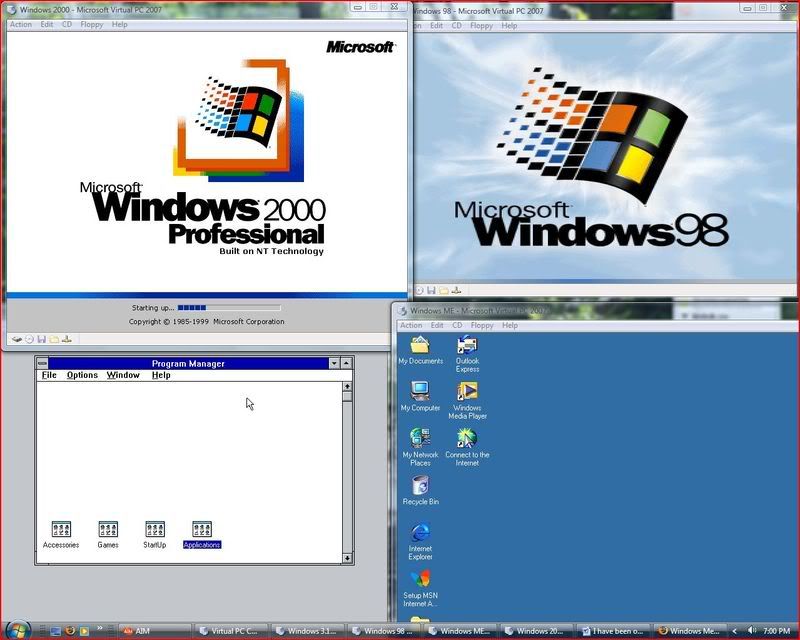
I am using Microsoft Virtual PC 2007 in order to install all of these operating systems without messing with any physical hardware. Call me constructively lazy, but the software optimizes the “hardware” so I don’t have to. I can just have a little fun.

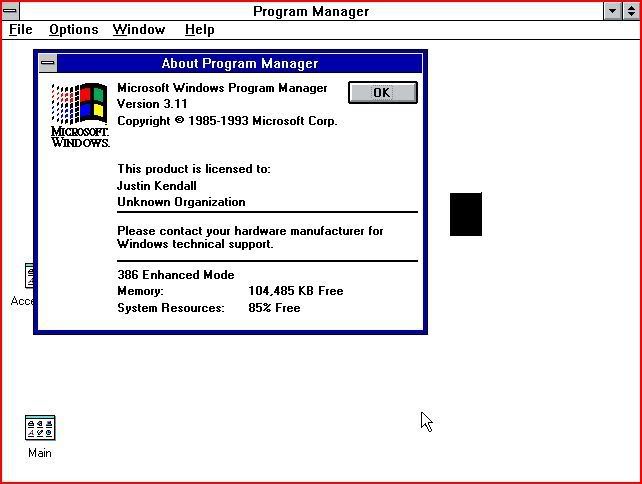
Windows 3.11

Yes... I said Windows 3.11. All of us who are over 20 years old have used it. We just choose not to talk about it.

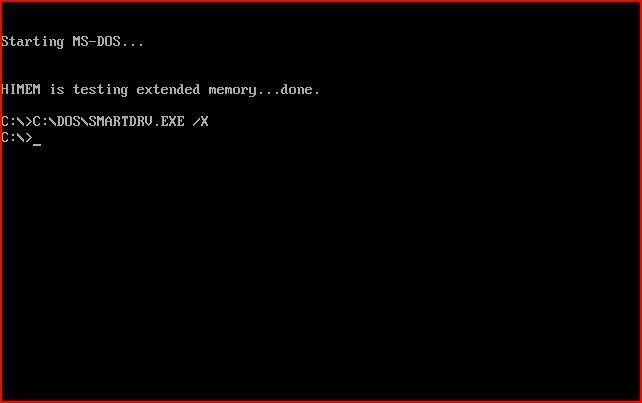
II am DOS... No one can hear your screams!nstallation of this bad boy was a real challenge. I went through three attempts before I finally had the light bulb kick on that told me that I needed to install DOS first. So I installed DOS 6.22 and then ran the setup again. Installed like clockwork.

I had to set the VM options such that it thought it was running with a 16 bit 386 computer! Just to add to the insanity, I also gave it 128MB of RAM!

Nowhere else in the iterations of Windows is it more apparent that DOS-based Windows is just an application than with version 3.11. Windows 3.11 all the way up to Windows ME was just a graphical fState-of-the-art for 1993!ront-end to DOS. Windows itself wasn’t really an operating system until NT rolled-out with an integrated Kernel.

I haven’t used Windows 3.11 in decades. Even though it only took about 45 seconds booting from an ISO, it was a real pain in the ass to install. The graphics and features that came with this version of Windows were just plain awful. It is unbelievable that people actually voluntarily paid money for this at one point in time. Thank God Windows 95 came out. (I never thought I would say that!)

I can see that not much changed in the way of Solitaire from Windows 3.11 to XP.

Windows 95

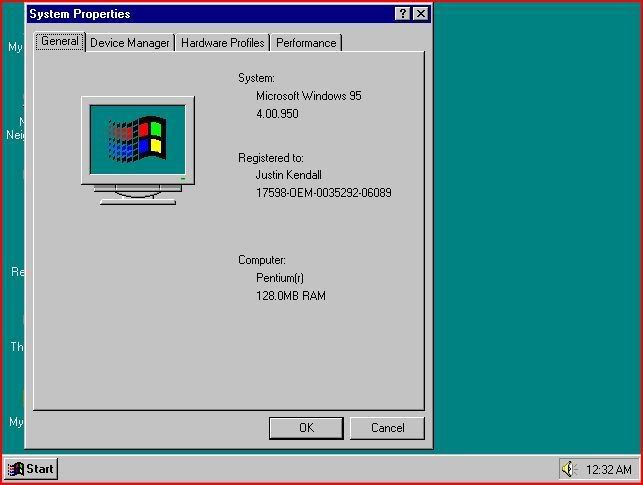
Windows 95 was a lot easier to install than I had remembered. Of course, installing Windows 95 on a machine with a 3.0 GHz Pentium 4 with Hyper Threading and 128MB of DDR allocated to it is hardly authentic for the era. Back then, seeing a computer with a 200 MHz Pentium processor with 32MB of EDO memory was commonplace. Those are now used as doorstops, boat anchors and filler in landfills.

Installation took about ten minutes. Even with the advanced set-up it was a breeze. Getting the thing to go to the internet was difficult, if not damn-near impossible! I can’t imagine an average computer user out there manually configuring their DNS settings and Default Gateway. That is unfathomable even by today’s standards! I never did get that working. It really wasn’t worth my time.

Windows 98 (SE)

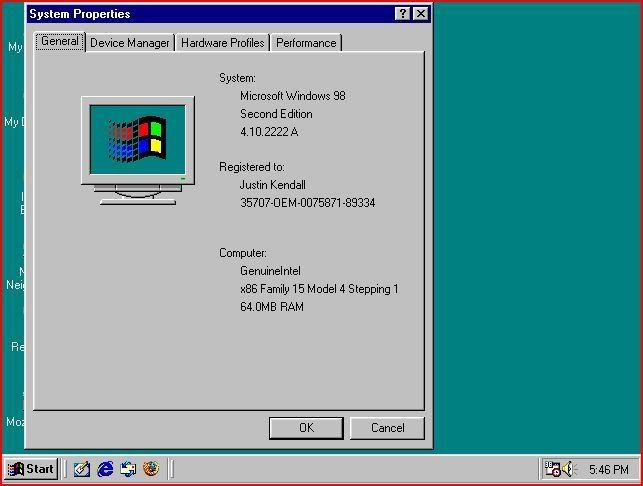
This is a version of Windows that most people didn’t see the point in giving-up until Windows XP became commonplace. I was working with Win 98 on a regular basis up until about 2003. Still today, it is usable on slower computers for people who may not have the money for a faster computer or an OS upgrade.

Installation of this version of Windows was as mind-numbing as I remembered it to be. 35 minutes means 35 minutes. I even jacked-up the RAM for the VM to 256MB and that still had no effect.

I did, however, enjoy the fact that the setup program automatically formatted the “hard drive” so I didn’t have to tool around in DOS with fdisk as I had to do for both Win 3.11 and Win 95.

Windows 98 was a big improvement over Windows 95 in many respects. But to the average user, only the little aesthetic things changed. It was much more stable than its predecessor in that it didn’t rewrite its own registry like a virus. It supported more memory. It also supported larger hard drives and partitions with the “new” FAT32 file system. This FS is still commonly used to transfer files from a Linux installation to a Windows installation in a dual boot environment due to the fact that many operating systems still support FAT32.

Another huge improvement over Win 95 was the “Automatically Detect IP/DNS Settings” feature. Getting online was sooooo much easier.

If Windows XP wasn’t as successful as it was, I think I would still be working with Windows 98.

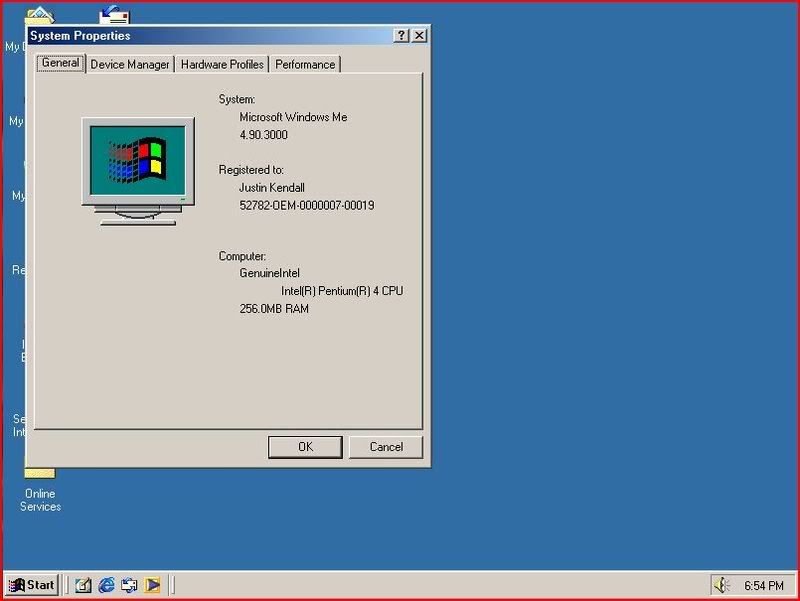
Windows MEWarning: looking at this picture causes brain damage!

This version of Windows is another one that we don’t talk about… EVER! But I am anyway. Microsoft made this aberration of an operating system in 1999 and then stopped supporting it six months later. It was the worst train wreck of an OS that Microsoft has ever had the nerve to release. On the plus side, this OS has made me more money than any other with people wanting to upgrade to something more stable… like Windows 98!

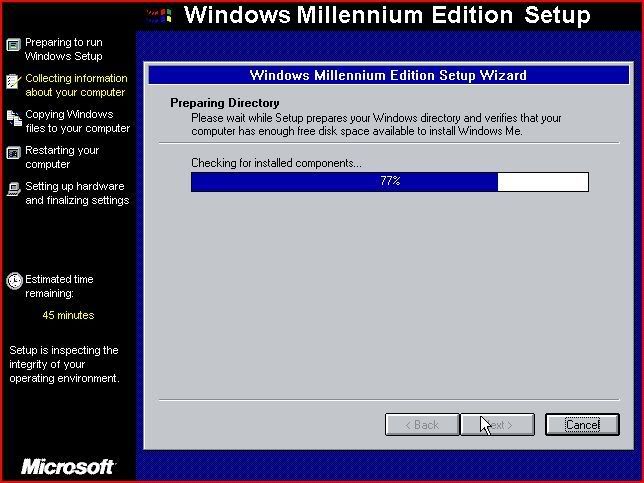
The installation process reminded me of Windows 95. Only with Windows 95, the boot disk had proper disk preparation utilities. The boot disk didn’t have a proper way to format c:\. I had to use the Win 98 boot disk for that! After that nightmare, I had to laugh as I read the “Sit back and relax while Windows ME is installed” and “This is the best version of Windows yet”! I have to wonder: should I relax?

I immediately started having problems after the first restart. It’s a wonder Microsoft put their name on such a product.

Windows 2000

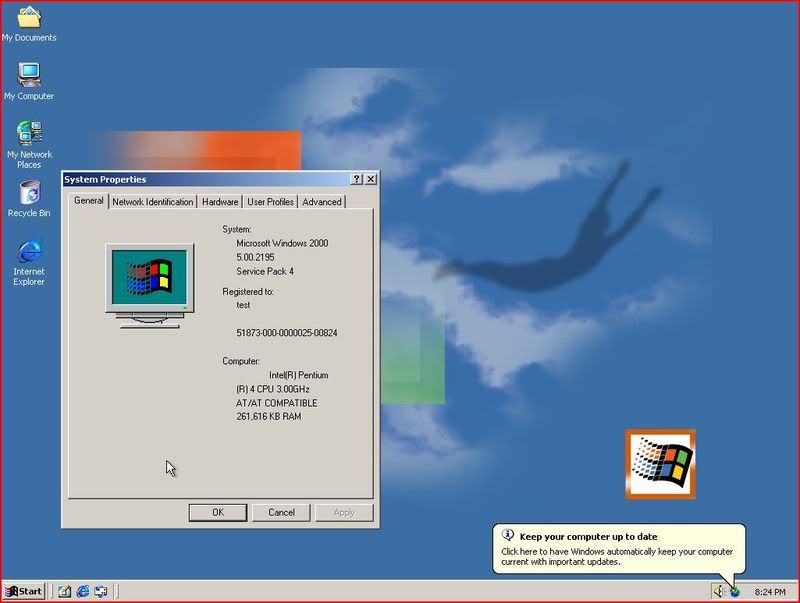
This version of Windows wasn’t used by very many people outside of the business world. It is still used today by many corporations due to the fact that it is a solid, secure and scalable operating system. Windows 2000 Professional was the first version of Windows to use the NT Kernel in a desktop environment. Everything using the NT Kernel before that was predominantly server-based.

I used Windows 2000 for a number of years at home and at work. I really enjoyed the fact that it didn’t randomly crash as much as Windows 95 and 98 did. Also, when I was poor and couldn’t afford to buy a copy of Windows XP, all of the programs that would work on Windows XP would work with Windows 2000! Windows 2000 was NT version 5.0 and XP was version 5.1. There is not much of a difference really. Windows XP is nothing more than Windows 2000 with some user-friendly bells and whistles throw-in.

Having installed it on Virtual PC, it is still as endearing to me today as it was six years ago.

Conclusion

Microsoft has progressed in its approach to user-friendliness and IT guy friendliness with the Windows installation process and Windows desktops. As much as the Mac guys like to poke-fun at PCs for being more Business-centered, I can see that they have shifted computers from being just something that is used for work to something that can also be used for fun. This is exhibited in XP and, depending on the version, Vista.

In a way Microsoft has also regressed and then came-back in security. Windows 95 through 2000 at least gave users the option of having a password right after installation. XP didn’t offer this feature but it did return with Windows Vista. Windows 3.11 doesn't really count. But with the addition of Active Directory, Service Pack Releases, anti-viral and other security applications, security has improved for the business and home users.

Having done this, I'm wondering what it is going to be like when I do this again in twenty years. Oh my God! How did we ever live back in those days with Windows XP and Vista?!

Saturday, December 22, 2007

My Memories Are Digital

I recently took a trip down memory lane. For most people, that involves watching home movies, calling old friends or looking at pictures in a dusty photo album. For me going down memory lane meant going through my hundreds of data CDs and seeing what was worth keeping and what was worth throwing in the bin.


In my early years as an IT guy, my labeling skills were non-existent. I would just burn a CD and not even label it. So looking through all of those CDs was like Christmas morning for me. I never knew what present was in store for me next.
The stuff that was in good shape and was worth keeping, I threw in a pile. The stuff that was all scratched-up and wouldn’t be read by my DVD-ROM got thrown in a shopping bag.


What was more interesting than the contents of the CDs were the reasons behind the contents being on the CDs. Many of the disks had a few applications on them and maybe some downloaded updates. The reasoning behind that was that back in 2002, when I started doing computer work for people, broadband internet wasn’t as prevalent as it is today. I would have to make a house-call and have to download something as simple as Ad-Aware or a Windows Update and it would take forever over their 56K dial-up connection. It really was worth my time to sit at home and download the stuff I needed and burn it all to a disc and take it with me.


Why burn it to a CD? Flash drives weren’t as prevalent back then either. I remember paying $45 for my first one and it only held something like 16M of data! Now I can buy a flash drive that is exponentially bigger for the same price.


Other little presents I found in the unlabeled CDs were operating system install disks from Windows 95 to Windows Vista and Linux: Kernel 2.1 to Kernel: 2.6.23. I also found versions of Microsoft Office going clear back to Office 97. The Windows CDs that worked, I was sure to create ISOs of and store safely on my file server. The Linux CDs (there were at least 50 of them all unsorted) I threw-out. If I ever need them I can just download what I need. I can’t remember the last time I needed Redhat 7.3. Windows OS disks I still need all the time for various reasons.


The discs that I made ISOs of, I tested their boot capabilities with Microsoft Virtual PC 2007. Surprisingly, only about 3 or 4 discs out of about 10 made it past the boot stage. All the rest were thrown in the bin. At least I know now what works and what doesn’t. And with all of them being LABELED, I can finally tell what is what.


In the end, I reduced my pile of about 300 CDs down to about 30. I found 12 blank CDs and DVDs. And I was able to put everything that had a case, back in its case. Go for a walk down memory lane sometime. You’ll feel as nostalgic as I do.

Saturday, December 15, 2007

Ice Storm

There is a big snowstorm blowing-in from Alberta overnight tonight. When I think about a big storm, I’m reminded of February of this year.

It was Valentine’s Day: an excellent day for a funeral. My last remaining grandparent was interred in a mausoleum just outside of Cincinnati. I was with my mom and we were about 200 miles from our house in Toledo. We had just spent a week with my aunt and uncle and my two young cousins. Our nerves were frayed already from the lack of a volume knob on the kids so we decided to head back after the funeral.

The car we were in was my mom’s 1997 Dodge Neon with an automatic transmission and bald tires.

We got as far as Dayton before things started getting sketchy. It had been raining ever since we left my uncle’s house. As soon as we got to Dayton, our fortune had turned into utter chaos. The rain had turned to freezing rain and snow. Any water that had been on the road had turned to ice.

There were some people who were “hot-dogging it”; but they soon learned their lesson. I saw one of them spin out of control right into the ditch. I wouldn’t be surprised if the car was a complete loss. It was quite spectacular.

It usually takes us a good half hour to get through Dayton on a good day with normal traffic. That day it took us a good hour to get through.

After that nightmare of white knuckle driving, my knuckles found a new shade of white. About twenty miles north of Dayton, things went downhill fast. It was near white-out conditions. The snow was about six inches deep and drifting across the road. The only way I could tell where the road was, was by seeing where the trucks made tracks. I could also follow them by faintly seeing the red taillights of the trailers off in the distance.

We went at a steady 25-30 MPH crawl following the same truck in a single-file line all the way to Wapakoneta.

By then, it had been four hours. Our nerves were fried after losing traction several times and maintaining a steely concentration on the road. We were also running low on fuel. I drove 100 miles and it just plain sucked. We were only at the half-way mark.

We were wondering if we should stop but the fuel situation settled that. Once we pulled-off of I-75, the snow had drifted over the road. It was about a foot deep in most places.

We filled the tank, got some coffee and got rid of some and then we were on our way. The snow was a foot deep at the gas pump and all the way back out to the road. My best bet was to tread where no other vehicle had tread. I got decent traction all the way to the road. I had to stop due to a big rig creeping by. That’s where I ran into trouble. It took a good five tries to get back on the road. I would skid sideways, the wheels would hook-up for about two feet and then I would be back in the same situation.

When I finally got back to the highway, it was back to the 25-30 MPH grind.

By the time we finally made it to Lima, the plow trucks had finally started plowing. But that was only for about ten miles. Then it was back to the six inch deep crap. I think it was at this point that I realized that we were the only passenger vehicle on the road. Everything else was big rigs.

We pressed-on through Findlay, Bowling Green and every other little farm town until we got to Toledo. By the time we got to Toledo, I was confident enough in my driving abilities to allow the radio to be turned-on. We learned that the entire state was under a Level 3 Snow Advisory. For those not in the know, that is where no one besides emergency personnel are allowed to be out on the roads. That explains why there wasn’t anyone else out on the roads. What were the cops going to do really? We were already in Toledo. They might have just told us to go home. Trust me; at that point, I wanted to be nowhere else.

I-75 twists and turns through Toledo like a season of Dexter. By the time we finally got off of 75, we had seen 24 cars in the ditch. We were fortunate enough to not be one of them.

The side streets were either as bad as the highway or plowed with a solid sheet of bare ice. I preferred the former.

The driveway was eighteen inches down in the snow. The steep incline at the end of the driveway was no easy picnic to get up either. I tried getting a good run for it and just gunning it hard; but the automatic transmission really sucked at controlling torque on the wheels.

We tried shoveling the driveway, salting the ice (with temps below 17ยบ, it didn’t help). I finally ended-up getting my neon with a manual transmission and new tires to tow Mom’s car up the driveway. That was a barrel of monkeys.

I think after the harrowing eight to ten hour journey from Cincinnati, I soaked in a hot bath until it was cold to relieve the tension and then slept for twelve hours.

I’m sure that wasn’t the last or the worst I will ever drive in. One could only hope.

Saturday, December 8, 2007

Adventures with Beer Making!


The 18th Amendment to the Constitution of these United States was an abomination imposed on the masses by a very vocal minority. The lobbying group for temperance who swayed the Congress to prohibit the sale and consumption of alcohol had good intentions. Health and crime were their main concerns. But what it gave rise to was organized crime and a higher mortality rate from the consumption of such poisonous beverages as “bathtub gin”.

Thanks to these unforeseen consequences and other pressures, the Eighteenth Amendment to the Constitution became the first and only amendment to ever be repealed in the history of this country. The Twenty-First Amendment reversed the Eighteenth and restored to us the freedoms that were given away by the few back in 1919.

For the past month, Chad and I have been exercising our Twenty-First Amendment right to produce intoxicating beverages.

It all started with Chad getting the itch to start a home brewing operation. He had already had success with brewing his first batch of beer and wanted me to share in the experience. I was curious about exactly how much work goes into the creation of a batch of beer.

It requires about nine man-hours of time and four weeks’ worth of fermentation and maturation in order to have a decent batch of beer.

The ball gets rolling with the creation of the wort. The wort is beer before the yeast and the fermentation process. It requires massive amounts of boiling water, cold water, specialty grains, malted barley and hops. Beer definitely doesn’t smell all that great while it’s in these first few stages. What we had was, basically, a foul-smelling grain & hops tea in a giant brew kettle.

The different grains and hops and the amount of each and what is done during the fermentation process all determine what style the beer is.

In the case of my batch, we were making a cherry stout. This involved three pounds of bitter cherries as that little something extra to give it a distinctive taste.

Normally, after the wort has been made, the mix is strained (sparged) into the primary fermentation tank where yeast is added and the mix is left to sit for ten days. With this mix, the sparging was left for five days in order to let the yeast feast on the cherries and to let the taste sink-in a bit.

After the batch was sparged, it was placed in a PETE Carboy for secondary fermentation.

After that was over, it was time to start cleaning all of the empty bottles that were lying around. Each 5 gallon batch is roughly fifty 12oz. bottles’ worth of beer. Thoroughly cleaning fifty beer bottles so that they are ready to receive beer takes roughly two and a half hours. Most of the work is done in the bathtub in a volume of hot water to make the glue on the labels soft enough to get them off. The insides of the bottles are rinsed-out about 5 times in various solutions in order to promote sanitation. A bottle brush was used as necessary in order to get the insides of the bottles spotless.

When all the bottles were immaculate and the priming sugar was added to the mix (for carbonation), it was time to start filling bottles. That was a fun process that for which I apparently had a knack. The batch of cherry stout yielded forty-four bottles.

While the beer was bottled, it still wasn’t ready to drink. It was sampled but it’s not ready for wide-spread consumption yet. While still uncarbonated and warm, the beer was the best I had ever tasted. It came a long way from the putrid tea on the stove.

The taste of a home-brewed beer is matched by none. After drinking a full-bodied beer like that, Budweiser, Miller and Busch seem to be watery, tasteless and cheap by comparison. Also, nothing beats the sense of accomplishment.

Pictures and Video!


Bathtub-o-bottles!

BATHTUB TROUB!

Carboy to bottling bucket.

Drinking from the bucket.

Bottle filling!

Thursday, December 6, 2007

SUPERHUB TO THE MAX!

I'm currently an out of work IT guy who is in school working toward my CCNA certification. This semester has taught me a lot about how things have changed in the short time since I was in school for my Bachelor's degree. I ripped on people quite a bit; but the people at the college I'm at take ripping on people to a whole other level. And I got sucked-in. I'm going to let Murderface explain this level of "ripping on people"


I have the tendency to put my foot in my mouth quite a bit. But I’m not nearly as agile from inserting my foot as this one guy from my CCNA class. His name is unknown to me. The running joke all semester has been to call him “The Egg Man”. That’s only because he reminds me of this guy. Mean? Perhaps.

He created the running joke of the semester just by opening his mouth sometime in the first few weeks. He was trying to impress us all with his “vast knowledge” of networking. He was telling us about this spiffy new router that he got that was just the bees’ knees. I was following him up to a certain point. The router he mentioned didn’t come with a built-in switch so he was left to fend for himself to get one.

OK, so far it’s sounding alright. Most of the high-end routers are just routers with switch sold separately. But what he said next totally stunned all who heard it. It was one of those moments where everyone was just shocked, awed and all shared the same thought… “WTF?! HE DID NOT JUST SAY THAT!”

The next thing that came out of his mouth was explaining to us how he took a bunch of 10 Base-T hubs (run at 10Mbps) and daisy-chained them together to get gigabit Ethernet (1000Mbps).

I know what you’re thinking… “WTF?! HE DID NOT JUST SAY THAT! STFU nUb!” Oh yeah he did.

This social faux pas was immediately put an end to by everyone involved calling bullshit. He lost all credibility the rest of the semester as an “authority” of everything but breathing. His insane yarn of bullshit was called “The SuperHub” the rest of the semester. We gave it mythical status and powers after a while like some people do with Chuck Norris.

The SuperHub was able to:
  • Send 120V AC through the air to power a PLC
  • Satisfy all of the networking needs of the school
  • Replace Jay Taylor’s impressive lab equipment
  • Powered by freaking elves and nothing else!
  • Performs parallel tasks more efficiently than my Beowulf Cluster
  • Get my f’ing cable TV working!
  • Make coffee in the morning without being told.

Today while bored and alone in the CCNA lab, I built a SuperHub. Unfortunately, I lacked the fairy dust and the lack of common sense involved to make the damn thing work with Gigabit Ethernet. (DAMN!)

PICTURES!


My SuperHub rack-mounted with all that nice Cisco stuffs.


Whiteboard example of what the SuperHub should do… in the mind of one sick cat who can’t tell the difference.